EN
EN

Bitpanda
Crypto taxes on Bitpanda: You’re in the right place
Filing cryptocurrency taxes can feel overwhelming. The regulations are unclear, and official guidance often fails to answer all the important questions.
Meanwhile, tax authorities are gaining more and more access to data from crypto exchanges, including platforms like Bitpanda. A growing number of exchanges are now required to share information about your transactions.
That’s exactly why Divly exists. We created a tool that guides you step-by-step through filing your taxes in full compliance with local rules, without the stress or uncertainty. In this guide, we’ll show you exactly how to report your transactions made on Bitpanda.
When Should I Declare My Cryptocurrencies?
You declare crypto from Bitpanda when you file your annual tax return in your country of tax residence. In many places this covers activity from January 1 to December 31 of the previous year, but some countries use a different tax year.
Common filing timelines (always check your local rules):
- United States: by mid‑April (quarterly estimated taxes may apply if you owe).
- Germany: usually by July 31 (extensions apply with a tax advisor).
- France: May/June (varies by department).
Plan to declare if you had any of the following on Bitpanda:
- Sold crypto for fiat (e.g., EUR).
- Swapped one crypto for another (many countries tax this).
- Spent crypto (including with the Bitpanda Card).
- Earned staking rewards or other yield (e.g., Bitpanda Staking/Earn).
- Received airdrops, bonuses, or cashback.
- Mining or other income in crypto.
What to prepare from Bitpanda:
- Trade history/CSV exports and account statements.
- Staking/rewards reports and any cashback or bonus records.
- Purchase history for savings plans and card spending records.
How to export your Bitpanda transaction history
You can either download a CSV file with your transaction history or programmatically access your transaction history using the Bitpanda API. More information can be found below.
Automatic import
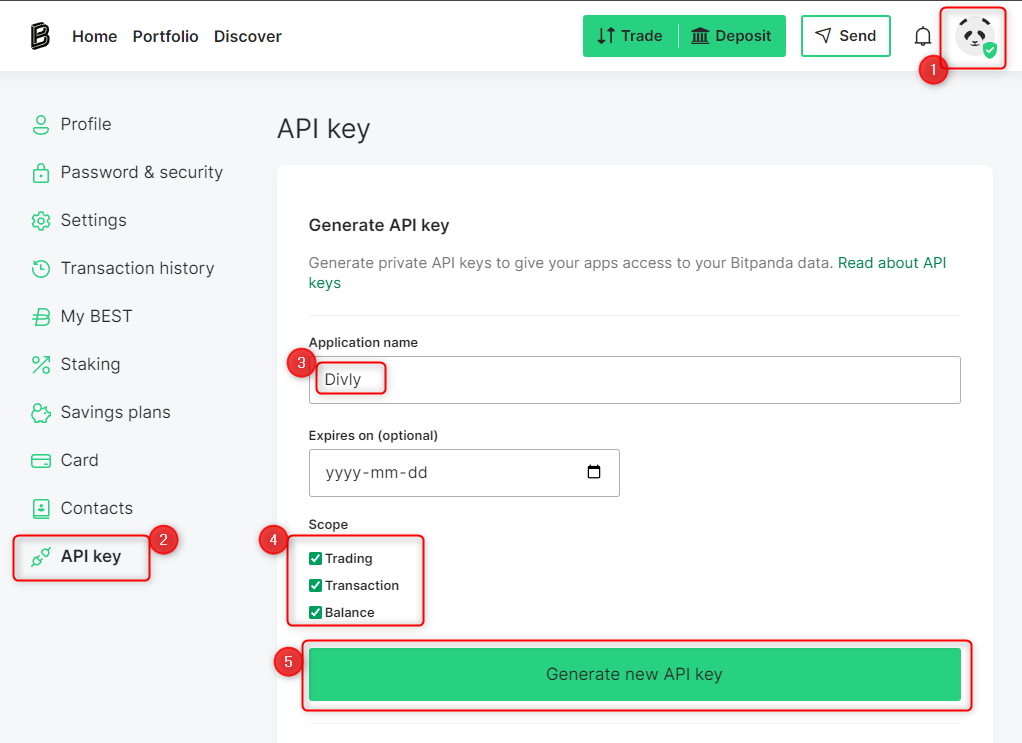
You can import your Bitpanda transactions automatically using the Bitpanda API.
- Sign in to Bitpanda.
- Click on the account icon in the top right corner and select API key.
- Provide the Application name: Divly , and provide the permissions Scope: Trading, Transaction, and Balance (all of these permissions are read-only).
- Click Generate new API Key. Bitpanda will send a confirmation email to your email.
- After the API Key is generated, copy and paste the API Key into Divly to generate your tax report.
File import
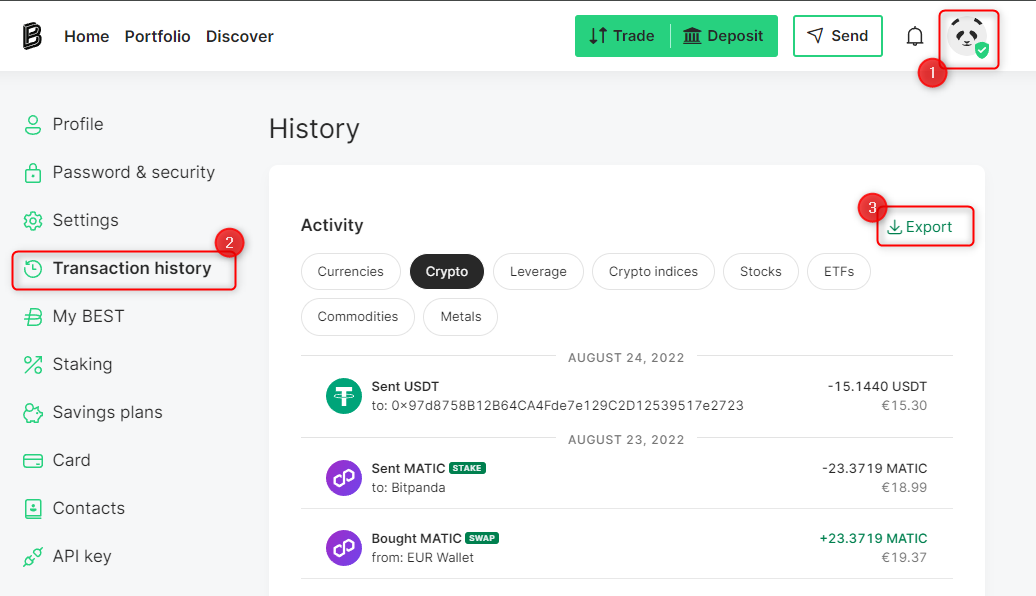
You can import Bitpanda transactions into Divly by downloading and importing a CSV file. Make sure to download the CSV file every time you want to include the latest transactions.
- Sign in to Bitpanda.
- Click on the account icon in the top right corner and select Transaction history.
- Click Export -> Transaction history -> Generate CSV and the CSV file will start downloading.
- Upload the CSV file to Divly. Divly will import the transactions and calculate your taxes.
Need help?
If you have any issues with calculating your Bitpanda taxes, feel free to contact our support team which is available via the online chat on the bottom right hand corner of our website.
 Why is Divly the best choice for Bitpanda taxes?
Divly is tailored for your country with a focus on accuracy. Unlike generic tools, we automatically create the compliant, country-specific tax report you need. We take care of complex local tax rules so you do not have to.
-
Fast Import: Fast import of Bitpanda transactions that combines with your other wallets/accounts.
-
Accurate Calculations: Accurate calculation of your taxes with gains/loss and the right cost method (e.g. FIFO).
-
Local Tax Report: Simple download of local tax report with a step-by-step guide on how to declare in your country.
Frequently asked questions (FAQ?)
Yes, in most countries you are required to pay taxes on crypto. For more details see your country-specific crypto tax guide.
Crypto typically incurs a capital gains tax in the majority of jurisdictions. This means you need to pay taxes on the difference between what you bought crypto for and what you sold it for (minus fees).
If you received crypto through other methods (e.g. salary), methods like income tax will apply.
Yes, you can use Divly to declare crypto taxes for previous years that you missed. In many countries you can self-report mistakes and not get penalized for it.
Divly provides localized guides on how to fix previous years for many of our supported countries.
It is a criminal offense to not pay your taxes. It is also difficult to avoid since crypto transactions are recorded publicly on the blockchain and exchanges have been forced to hand over information to local tax authorities.
Yes, you need to file a tax report even if you lost money. The good news is that by filing your losses you may be able to reduce your taxes.
Divly is a premium service to help people calculate and submit their crypto taxes. We use industry standard practices to secure your data.
- We do not sell your information to third parties such as other companies or government agencies.
- We do not perform any KYC. Divly only requires an email address and your pseudonymous crypto transactions to generate your taxes.
Feel free to use a temporary email / protonmail. You can also delete all your transactions and synched wallets at any time.
Yes. You can safely ask your accountant to create and manage a new Divly account for you, or invite them to see and/or edit your existing Divly account. Divly provides accountants with a special feature to manage multiple clients with crypto.
Any tax-related information provided by us is not tax advice, financial advice, accounting advice, or legal advice and cannot be used by you or any other party for the purpose of avoiding tax penalties. You should seek the advice of a tax professional regarding your particular circumstances. We make no claims, promises, or warranties about the accuracy of the information provided herein. Everything included herein is our opinion and not a statement of fact. This article may contain affiliate links.