EN
EN
88

Ease of filing taxes with Bybit
Overall score: 88/100
Ease of filing taxes with Bybit
Overall score: 88/100
Crypto taxes on Bybit: You’re in the right place
Filing cryptocurrency taxes can feel overwhelming. The rules are complicated, and official guidance often does not answer all your questions.
At the same time, tax authorities are getting more access to data from crypto exchanges, including platforms like Bybit. More exchanges are required to share information about your transactions.
That’s exactly why Divly exists. We built a tool that guides you step-by-step to file your taxes in full compliance with local regulations—without the stress or guesswork. In this guide, we’ll show you exactly how to report your transactions made on Bybit.
When Should I Declare My Cryptocurrencies?
You should declare your Bybit activity for your country’s tax year and file by your local deadline. Most places require annual filing, and some also require estimated/advance payments during the year if you owe enough tax.
What to include from Bybit:
- Spot trading and Convert swaps (crypto-to-crypto and crypto-to-fiat disposals)
- Derivatives (USDT/USDC perpetuals, inverse contracts, futures, options): realized PnL when you close/settle a position; liquidations; funding payments and rebates (often income/expense)
- Bybit Earn and rewards: staking/savings yield, Launchpool/Launchpad tokens, Dual Asset returns, liquidity mining
- Airdrops, referral bonuses, cashback, trading rewards and fee rebates (usually taxable income when received)
- Copy Trading PnL and bot/strategy PnL
- Fees and interest may be deductible depending on local rules
Typical tax-year periods and deadlines (examples, check your local rules):
- United States: Jan 1–Dec 31; file by Apr 15 (next business day if a holiday). Quarterly estimated taxes may be due Apr 15, Jun 15, Sep 15, and Jan 15.
- United Kingdom: Apr 6–Apr 5; online Self Assessment by Jan 31 after the tax year. Payments on account usually Jan 31 and Jul 31.
- Germany: Jan 1–Dec 31; file by Jul 31 (extensions apply if filed by a tax advisor).
Helpful points:
- You may need to declare even if you never withdrew to fiat. Taxable events often occur when you trade, convert, close derivatives, or receive rewards.
- Transfers between your own wallets are usually not taxable, but keep records.
- Keep complete records all year: trades, deposits/withdrawals, prices, fees, funding, and rewards. Export your Bybit history and statements regularly.
- Some countries also require reporting end-of-year holdings or foreign exchange accounts.
- If you think you will owe tax for the year, check whether you must make quarterly/advance payments.
How do I file taxes with Bybit?
There are three main steps you need to take in order to do your crypto taxes, these include: exporting your transactions history, calculating your gains, and submitting the correct tax form do your tax authority. We'll walk through the entire process in this guide.
Step 1: How to export your ByBit transaction history
You can export your transaction history by either downloading ZIP files from Bybit, or by using their API. Due to API time restrictions, we recommend using the ZIP files.
File Import
You can import Bybit transactions into Divly by downloading and importing their ZIP file. Make sure to download a new ZIP file every time you want to include the latest transactions.
- Sign in to Bybit.com or Bybit.eu.
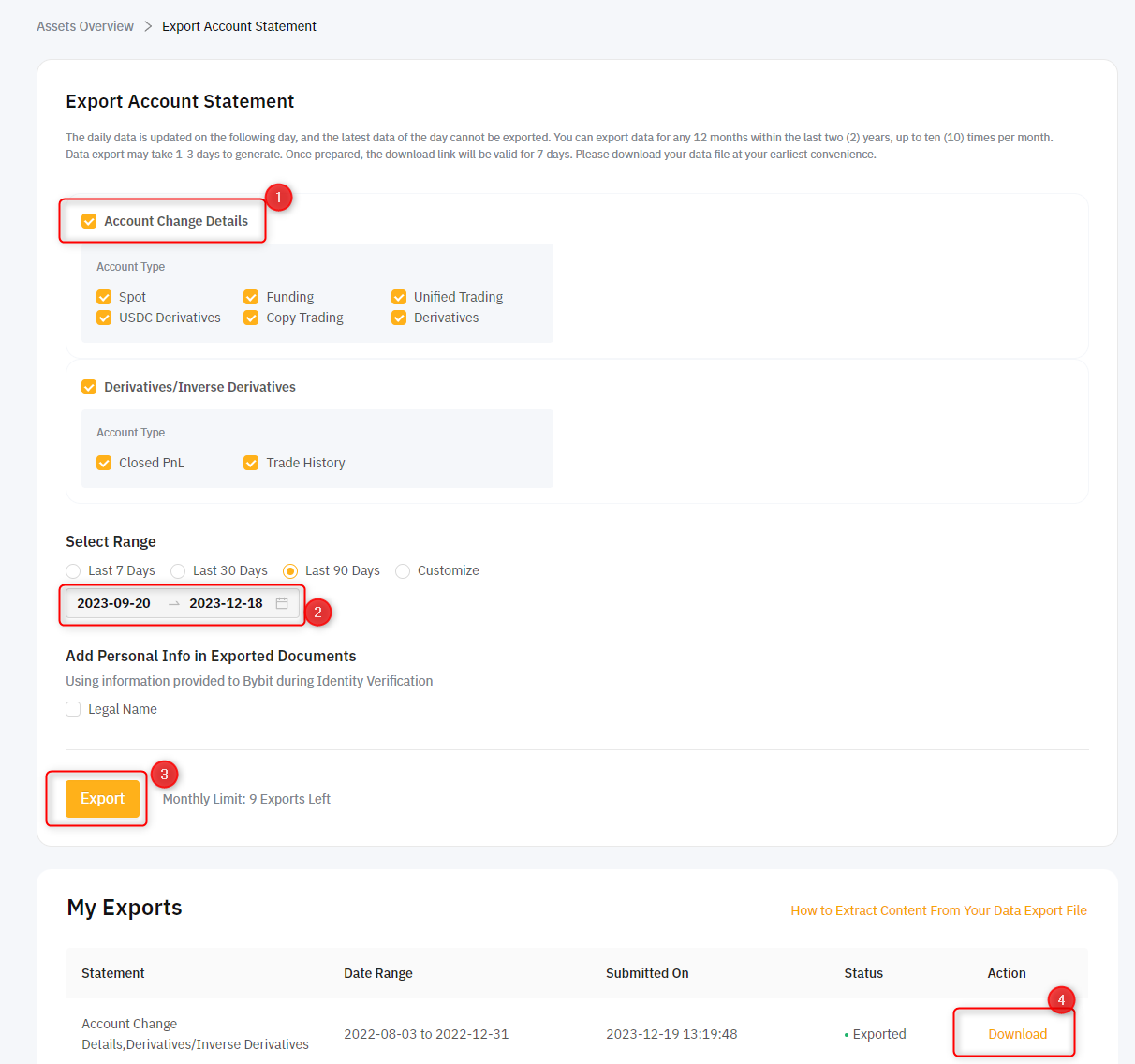
- Click on the account icon in the top right, then Account -> Data Export. Here is a direct link to Bybit.com Export Statements or Bybit.eu Export Statements,
- Under the tab Transaction Log: Select all your Accounts and all the available Types. Set the Time (UTC) to the year you had transactions. Since Bybit only allows you to export max 1 year at a time, you will need to create one file per year.
- Click on Export Now and wait for the file to generate under My Exports. Once ready you can click Download.
- If you have traded derivatives or used trading bots, please go to the tab Order History. Select all your Accounts and all the available Types. Set the Time (UTC) to the year you had transactions. Since Bybit only allows you to export max 1 year at a time, you will need to create one file per year. Click on Export Now and wait for the file to generate under My Exports. Once ready you can click Download.
- In Divly, drag and drop one ZIP file at the time until all transactions have been imported.
Automatic Import
You can import transactions from Bybit into Divly by using our API integration. After you have provided the API keys, Divly will be able to fetch your latest transactions anytime.
- Sign in to Bybit.com or Bybit.eu.
- Click on your account icon in the top right and then API in the submenu.
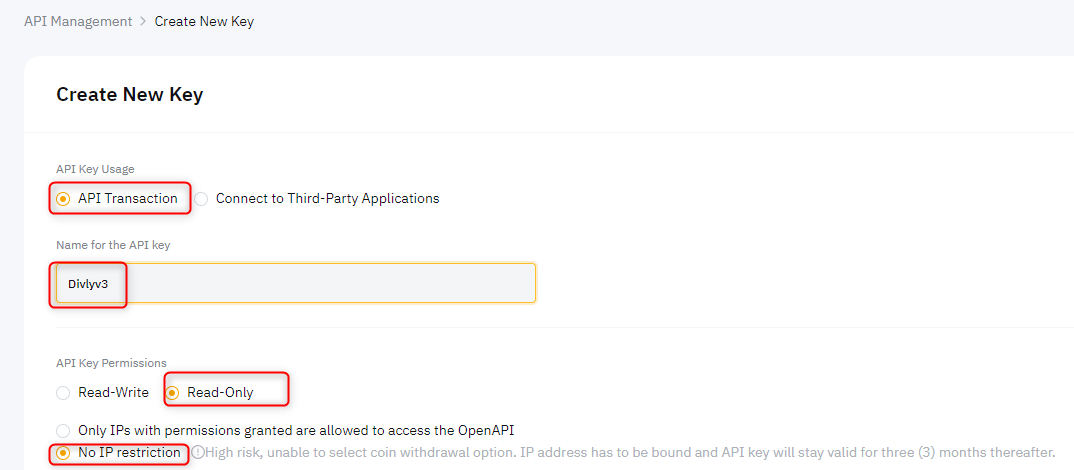
- Click the button Create New Key and select System-generated API Keys.
- Set API Transaction, enter a Name (e.g. Divly).
- Keep default Read-Only and No IP restriction.
- Check all the boxes next to Unified Trading, Earn, Fiat trading, Assets, etc.
- Click Submit and enter your 2FA code.
- Copy the API Key and API Secret into Divly.
Step 2: Calculate your Bybit taxes
There are typically three ways to calculate your taxes. The method chosen depends on how much you are willing to pay and your knowledge of your country's tax laws.
Option A: Use a program like Excel and do all the calculations manually. This is free but can be time consuming and require a deep understanding of tax rules.
Option B: Us a tax platform like Divly to import your transactions and automate the calculations for you. Saves a lot of time for the price tag you pay.
Option C: Pay a tax lawyer to do your tax return for you. The most expensive option but can be worthwhile if you feel calmer having an expert doing everything for you.
Once you have chosen your method, the common transaction types from Bybit you will need to consider in your calcualtions include the following:
Withdrawls
Withdrawals refer to crypto transactions sent out of a ByBit account. If you sent your crypto to another crypto wallet you own, make sure it is matched as a Transfer to avoid it being treated as a sale. If the withdrawal refers to a P2P trade, gift, buying goods/services, or another transaction type, please label it accordingly when using Divly. The transaction type applied can affect your taxes.
Deposits
Deposits refer to crypto transactions being sent to your ByBit account. If you received crypto from another crypto wallet you own, make sure it is matched as a Transfer to avoid it being treated as a purchase. If the deposit refers to a received gift, mining income, or another transaction type, please label it accordingly when using Divly. The transaction type applied can affect your taxes.
Trades
Crypto trades refer to crypto being purchased for fiat, crypto being sold for fiat, or trading one cryptocurrency for another. On ByBit, these transactions are respectively called Buy, Sell, and Trade. Typically a Buy is not a taxable event, yet these transactions are still required to calculate the cost basis. A Sell or a Trade are seen as taxable events in most countries.
Inverse Perpetual
The Inverse perpetual contracts use BTC/ETH/EOS/XRP as the base currency. Traders need to confirm traded quantities in terms of USD (Quoted currency) and then use their base currency (such as BTC, ETH) to calculate margin, profit, and loss. If a trader wants to trade a BTCUSD contract, he must use BTC as his base currency. If he trades on ETHUSD contracts, he needs to hold ETH. Divly imports these transactions as Realized Profit or Realized Loss.
USDT Perpetual
USDT perpetual contract is a linear contract. The margin used for a linear contract is USDT, and calculation of margin and P&L of the perpetual contract is more direct. When trading 1 BTC and the price moves by 100 USDT, the profit/loss of the trader will be 100 USDT. Divly imports these transactions as Realized Profit or Realized Loss.
Inverse Futures
Bybit’s futures contracts are futures that have a predetermined settlement date and all positions have to be settled latest by a specific date. Inverse futures just mean that the payoff structure for your position is non-linear. The P&L is calculated so that the profit on the collateral you use matches the denomination of the contract as price adjusts. Divly imports these transactions as Realized Profit or Realized Loss.
Step 3: Submit the tax forms to your tax authority
The structure of the tax forms differ greatly based on your country. If you are using a service like Divly, the tax form will be automatically generated in a localized format with instructions on how to submit it.
If you are doing everything yourself, make sure to research exactly what needs to be declared. For more information see our crypto tax guides.
Common issues when calculating your ByBit taxes
If you are facing issues using the API, we recommend switching to the File Import. The Bybit files are more complete and cause less issues when calculating taxes.
If you have any issues with calculating your ByBit taxes, feel free to contact our support team which is available via the online chat on the bottom right hand corner of our website. Good luck!
 Why is Divly the best choice for Bybit taxes?
Divly is built for each country with a strong focus on accuracy. Unlike generic tools, we automatically generate the compliant, local tax report you need in your country. We handle the complex local rules in your tax legislation so you do not have to.
-
Fast Import: Quick import of Bybit transactions that combines with your other wallets and exchanges.
-
Accurate Calculations: Correct gains and losses using the right cost basis method (e.g. FIFO).
-
Local Tax Report: Easy download of your country-specific tax report with a step-by-step filing guide.
Frequently asked questions (FAQ?)
Yes, in most countries you are required to pay taxes on crypto. For more details see your country-specific crypto tax guide.
Crypto typically incurs a capital gains tax in the majority of jurisdictions. This means you need to pay taxes on the difference between what you bought crypto for and what you sold it for (minus fees).
If you received crypto through other methods (e.g. salary), methods like income tax will apply.
Yes, you can use Divly to declare crypto taxes for previous years that you missed. In many countries you can self-report mistakes and not get penalized for it.
Divly provides localized guides on how to fix previous years for many of our supported countries.
It is a criminal offense to not pay your taxes. It is also difficult to avoid since crypto transactions are recorded publicly on the blockchain and exchanges have been forced to hand over information to local tax authorities.
Yes, you need to file a tax report even if you lost money. The good news is that by filing your losses you may be able to reduce your taxes.
Divly is a premium service to help people calculate and submit their crypto taxes. We use industry standard practices to secure your data.
- We do not sell your information to third parties such as other companies or government agencies.
- We do not perform any KYC. Divly only requires an email address and your pseudonymous crypto transactions to generate your taxes.
Feel free to use a temporary email / protonmail. You can also delete all your transactions and synched wallets at any time.
Yes. You can safely ask your accountant to create and manage a new Divly account for you, or invite them to see and/or edit your existing Divly account. Divly provides accountants with a special feature to manage multiple clients with crypto.
Any tax-related information provided by us is not tax advice, financial advice, accounting advice, or legal advice and cannot be used by you or any other party for the purpose of avoiding tax penalties. You should seek the advice of a tax professional regarding your particular circumstances. We make no claims, promises, or warranties about the accuracy of the information provided herein. Everything included herein is our opinion and not a statement of fact. This article may contain affiliate links.